
hhmm.. sometime you may want to have windows XP as gateway instead of linux…
the reason might be varies.. depend on the current situation you’re having .
let’s start.
go to Start > run >
type regedit … press Ok.

something as below should appear..

browse to HKEY_CURRENT_MACHINE]\\ 
right click at IPEnableRouter -> Modify … change the value to 1.
as this pic.

i think have to reboot your machine after changing those registry before it can be
effective.. else log out and log in back also can work..
hmm.. now connect the U-Mobile or your modem to internet what so ever.

then.. need to setup internet connection sharing for this modem with other network device..
go to Start -> Connect -> All Connection

then.. i think just have to follow this sequence

this will assign the ip of 192.168.0.1 to the selected network device straight away..
but if you want to change also can..
after clicking yes…
go back to the that network device properties..
at tcp/ip .. put in your desired ip.. and netmask.. but leave the gateway as blank..
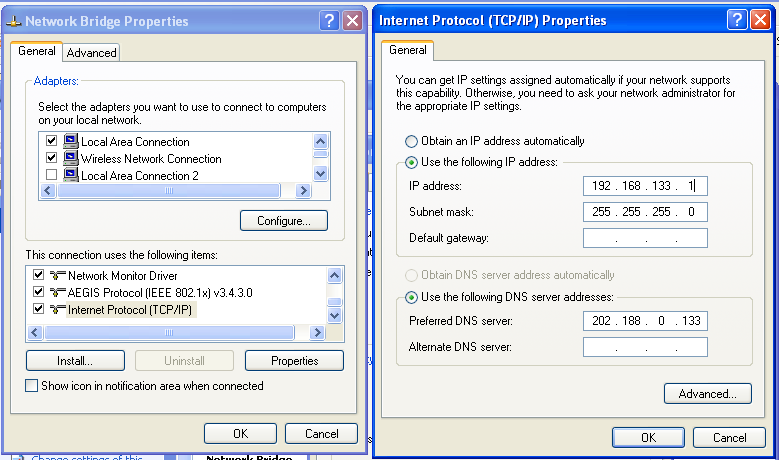
from other pc.. can use this ip as gateway ip address.
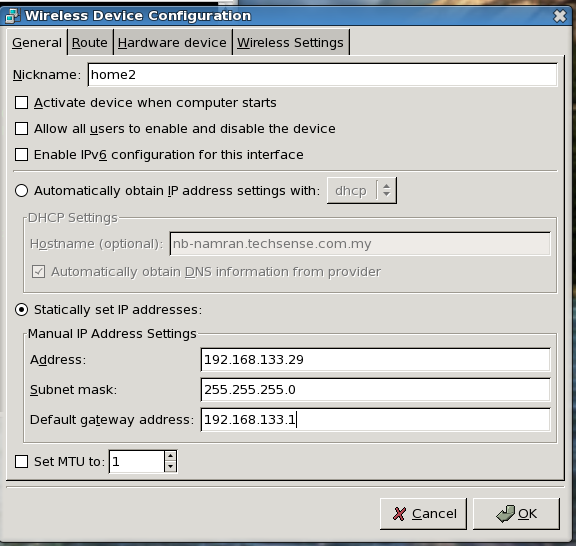
from linux.. system-config-network..
set static ip.. and the ip of windows xp as gateway
This is a great article. I was able to setup a monitoring service quickly. I have visited a lot of websites and none of them got me to a place where I could monitor my servers this quickly.
Thanks
Girish
to use snmp to monitor other thing..
better to get the utils correct with this.
yum install net-snmp-utils
and then can test with ..
snmpwalk -v 1 localhost -c public system
Looking forward start investing very soonBeautiful! Great site!