
edit /etc/xinet.d/tftp
change the line
disable = no
service xinetd restart
y u m i n s t a l l t f tp -y
to u c h /tftpboot/file.txt
t f t p localhost
g e t file.txt
if succeed.. then you t f t p server is working fine…
now to setup DNS server..
set manual ip for yourself first.
vi /etc/sysconfig/network -scripts/ifcfg-eth0
DEVICE=eth0
BOOTPROTO=none
HWADDR=00:14:22:C6:75:FA
ONBOOT=no
TYPE=Ethernet
USERCTL=yes
IPV6INIT=no
PEERDNS=yes
NETMASK=255.255.255.0
IPADDR=192.168.101.20
vi /etc/dhcpd.conf
add following lines..
ddns-update-style ad-hoc;
subnet 192.168.101.0 netmask 255.255.255.0 {
range 192.168.101.1 192.168.101.19;
filename “linux-install/pxelinux.0”;
}
cd /tftpboot/linux-install
mkdir centos4
cd centos4
wg et http://mars.techsense.com.my/repository/centos4/centos/4/os/i386/images/pxeboot/initrd.img
wg et http://mars.techsense.com.my/repository/centos4/centos/4/os/i386/images/pxeboot/vmlinuz
cd /tftpboot/linux-install/pxelinux.cfg/
touch default
vi default
key in the following.
default centos
timeout 100
prompt 1
display msgs/boot.msg
F1 msgs/boot.msg
F2 msgs/general.msg
F3 msgs/expert.msg
F4 msgs/param.msg
F5 msgs/rescue.msg
F7 msgs/snake.msg
label centos
kernel centos4/vmlinuz
append initrd=centos4/initrd.img ramdisk_size=7000
if succeed..
whenever booting from another machine to use PXE boot.. something like this will appear..
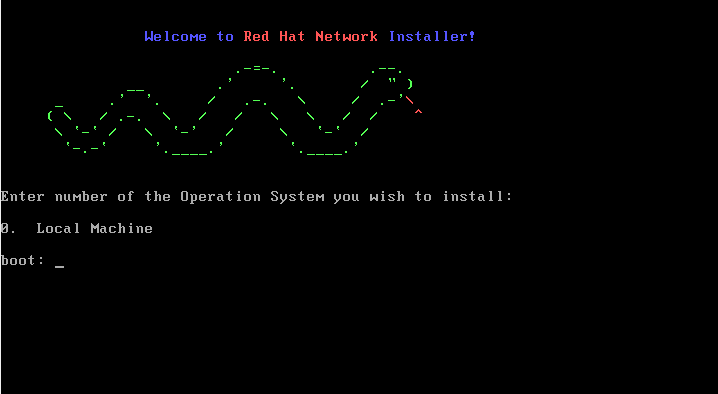
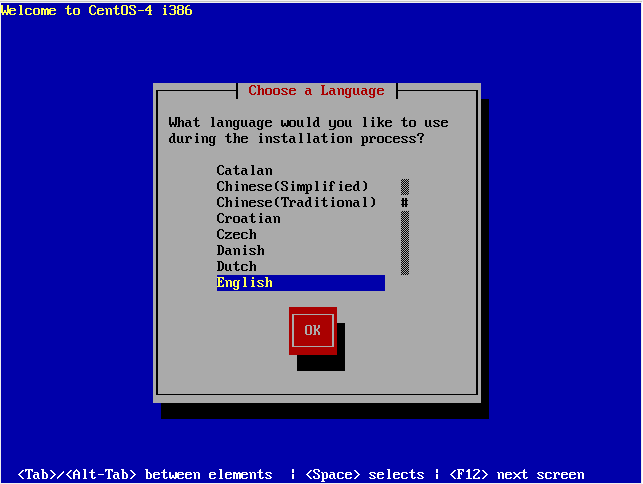
press enter.. and wait.. till something like below appear..
It is the best time to make some plans for the future and it’s time to be happy. I’ve read this post and if I could I want to suggest you some interesting things or advice. Maybe you can write next articles referring to this article. I desire to read even more things about it!
Thanks for sharing your info. I really appreciate your efforts and I am waiting for your further write ups thank you once again.
I do not even know the way I ended up here, however I thought this put up used to be great. I don’t recognize who you might be but certainly you’re going to a well-known blogger in case you are not already. Cheers!
What’s up, after reading this amazing article i am too delighted to share my knowledge here with colleagues.
Do you mind if I quote a couple of your articles as long as I provide
credit and sources back to your site? My blog site is in the very same niche as yours
and my users would genuinely benefit from some
of the information you present here. Please let me know if this okay with you.
Many thanks!
Incredible! This blog looks just like my old one! It’s on a completely different subject but it has pretty much the same page layout and design. Great choice of colors!
I really like what you guys are usually up too. Such clever work and coverage!
Keep up the amazing works guys I’ve included you guys to my own blogroll.