
.. the above title is already self-defined I think..
Ok, I was looking the proper setting for NTP (Network Time Protocol) stuff.
Ended up at the remote area of the Papua New Guinea.
If asked papa ‘Google’ on what is the ntp setting for Papua New Guinea.
it would lead to something as :
GMT+10
yes..that is correct.. but that is not what I am looking..
I am looking for something as such
MST-0800 for Malaysia equal to GMT+08
.. after few minute fiddling with it..
i think the answer for this is inside my laptop .. 🙂
then starting typing something like this to my terminal..
find / -iname "Papua"
a sec later.. eh wait..
why not just set my laptop timezone to Papua New Guinea with a nice timeconfig GUI and
locate the configuration file for localtime from there.. yay!
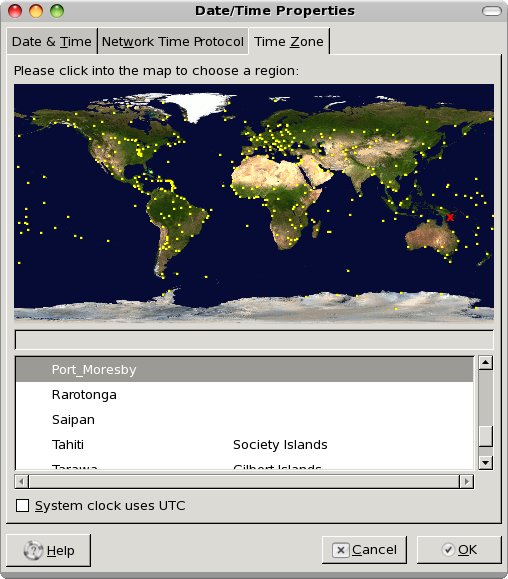
.. and guess what..
the setting is right at /etc/localtime
cat /etc/localtime
provide me the answer as ;
“PGT-10”
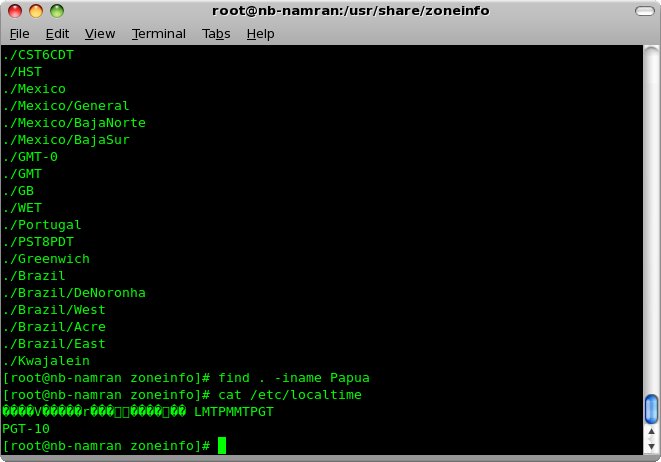
then I can set on my Acquisition Electronic (AE) as below :
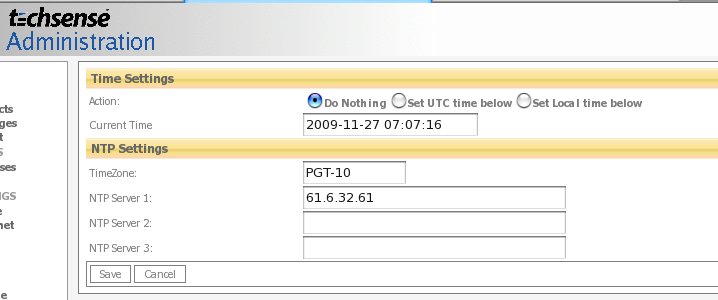
p/s : the answer turn out to be found without the net.. hahaha… just need be creative enough looking for it..
maybe can ask this sort of question to candidate..
“Ok.. the NTP setting for timezone for Malaysia is MST-0800..
provided you had a linux laptop …
explain how can you find the timezone for a country such as Papua New Guinea ..
without having to get to internet.. ”
(handle him a laptop with a CentOS livecd.. and give him about 30minute to come with at answer)
4) Module parameters.
———————
The following module parameters can be passed:
mode=
Possible values are 0 (round robin policy, default) and 1 (active backup
policy), and 2 (XOR). See question 9 and the HA section for additional info.
miimon=
Use integer value for the frequency (in ms) of MII link monitoring. Zero value
is default and means the link monitoring will be disabled. A good value is 100
if you wish to use link monitoring. See HA section for additional info.
downdelay=
Use integer value for delaying disabling a link by this number (in ms) after
the link failure has been detected. Must be a multiple of miimon. Default
value is zero. See HA section for additional info.
updelay=
Use integer value for delaying enabling a link by this number (in ms) after
the “link up” status has been detected. Must be a multiple of miimon. Default
value is zero. See HA section for additional info.
arp_interval=
Use integer value for the frequency (in ms) of arp monitoring. Zero value
is default and means the arp monitoring will be disabled. See HA section
for additional info. This field is value in active_backup mode only.
arp_ip_target=
An ip address to use when arp_interval is > 0. This is the target of the
arp request sent to determine the health of the link to the target.
Specify this value in ddd.ddd.ddd.ddd format.
If you need to configure several bonding devices, the driver must be loaded
several times. I.e. for two bonding devices, your /etc/conf.modules must look
like this:
alias bond0 bonding
alias bond1 bonding
options bond0 miimon=100
options bond1 -o bonding1 miimon=100
4) Module parameters.
———————
The following module parameters can be passed:
mode=
Possible values are 0 (round robin policy, default) and 1 (active backup
policy), and 2 (XOR). See question 9 and the HA section for additional info.
miimon=
Use integer value for the frequency (in ms) of MII link monitoring. Zero value
is default and means the link monitoring will be disabled. A good value is 100
if you wish to use link monitoring. See HA section for additional info.
downdelay=
Use integer value for delaying disabling a link by this number (in ms) after
the link failure has been detected. Must be a multiple of miimon. Default
value is zero. See HA section for additional info.
updelay=
Use integer value for delaying enabling a link by this number (in ms) after
the “link up” status has been detected. Must be a multiple of miimon. Default
value is zero. See HA section for additional info.
arp_interval=
Use integer value for the frequency (in ms) of arp monitoring. Zero value
is default and means the arp monitoring will be disabled. See HA section
for additional info. This field is value in active_backup mode only.
arp_ip_target=
An ip address to use when arp_interval is > 0. This is the target of the
arp request sent to determine the health of the link to the target.
Specify this value in ddd.ddd.ddd.ddd format.
If you need to configure several bonding devices, the driver must be loaded
several times. I.e. for two bonding devices, your /etc/conf.modules must look
like this:
alias bond0 bonding
alias bond1 bonding
options bond0 miimon=100
options bond1 -o bonding1 miimon=100