
No matter how did we listen to the music, sometime we just
need a good music as “halwa telinga”..and not more than that..
Many of the radio station nowadays , either been flanked with advertising
here and there.. but there are also trying very hard to get their own
propaganda through ~ via the air… (no pun intended ~ hehe).
Google for how many radio station is under “Media Prima”.
Same source.. how did you expect to get different thing ?
well.. I used to run my own radio server during student day @ USM
Engineering Campus , Nibong Tebal , Penang
(let’s see if some USM bot pickup this as news .~ hehe).
Because sometime , I have to be away from my own comfort room at hostel, and being somewhere with intranet connection..
such as at friend’s room/ event pc / school’s lab. .. then I just need to enter my own ip address into WinAMP/ Media Player / Real Player to tap to my own music streaming from my own pc.. hahaha.
That time also got it opened to all user in our network and connected via Mirc bot used to update the Song Title.. and also to attend to “Song Request” accordingly..
Well, is not perfect.. but it is kinda
entertaining..
when can see the small crowd managed to play with it a bit.~
As a getaway from the normal radio.. but sometime.. when bored.. also get it to tap to hitz.fm and re-broadcast for those who doesn’t have radio in room,
but have intranet/internet connection via LAN. 😎
Well, here I want to share how to setup our own radio server with almost free software available on the net.
First, download ShoutCast radio server installer or binary from shoutcast.com
the filename is
For Linux with glibc : http://yp.shoutcast.com/downloads/sc1-9-8/sc_serv_1.9.8_Linux.tar.gz
For Windows : http://yp.shoutcast.com/downloads/sc1-9-8/shoutcast-dnas-1-9-8-windows.exe
.. well for linux machine such as mine with Centos 5.3 .
just need to extract the binary
cd /tmp/ wget http://yp.shoutcast.com/downloads/sc1-9-8/sc_serv_1.9.8_Linux.tar.gz cd /home/user/bin/ tar zxfv /tmp/sc_serv_1.9.8_Linux.tar.gz |
this will extract these file
/home/user/bin/sc_serv /home/user/bin/sc_serv.conf |
now .. need to tune it a bit.
edit the /home/user/bin/sc_serv.conf
--- sc_serv.conf.orig 2009-07-02 20:26:55.000000000 +0800 +++ sc_serv.conf 2009-07-02 20:27:14.000000000 +0800 @@ -26,8 +26,7 @@ MaxUser=32 ; consist of only letters and numbers, and is the same server your broadcaster ; will need to enter in the SHOUTcast Source Plug-in for Winamp. THIS VALUE ; CANNOT BE BLANK. -Password=changeme - +Password=mypasshere1 ; PortBase. This is the IP port number your server will run on. The ; value, and the value + 1 must be available. If you get a fatal error when ; the DNAS is setting up a socket on startup, make sure nothing else on the @@ -140,7 +139,7 @@ NameLookups=0 ; will grant the right to kick, ban, and specify reserve hosts. ; The default is undefined (Password allows control for both ; source and admin) -; AdminPassword=adminpass +AdminPassword=mypasshere2 ; AutoDumpUsers controls whether listeners are disconnected if the source ; stream disconnects. The default is 0. @@ -155,7 +154,7 @@ AutoDumpSourceTime=30 ; on-demand content from. Subdirectories are supported as of DNAS 1.8.2. ; Default is ./content, meaning a directory named content in the same directory ; as where sc_serv was invoked from. -; ContentDir=./content +ContentDir=/data/mp3/content ; IntroFile can specify a mp3 file that will be streamed to listeners right ; when they connect before they hear the live stream. @@ -185,12 +184,13 @@ AutoDumpSourceTime=30 ; 'Billy plays the blues', then the net title is ; 'Justin Radio: Billy plays the blues'. Note: only works on non-relay servers. ; The default is no format string. -; TitleFormat=Justin Radio: %s +TitleFormat=HawkEYE Radio: %s - http://radio.namran.net ; URLFormat specifies a format string for what url is sent to the listener. ; Behaves like TitleFormat (see above). ; The default is no format string. -; URLFormat=http://www.server.com/redirect.cgi?url=%s +;URLFormat=%s +URLFormat=http://radio.namran.net/listen.pls ; PublicServer can be always, never, or default (the default, heh) ; Any setting other than default will override the public status |
well.. change the above to suit your need accordingly.
Then.. to run it..
cd /home/user/bin ./sc_serv |
if everything alright.. you will have something like this.

Oh.. you can also check it with internet browser .. such as Firefox.
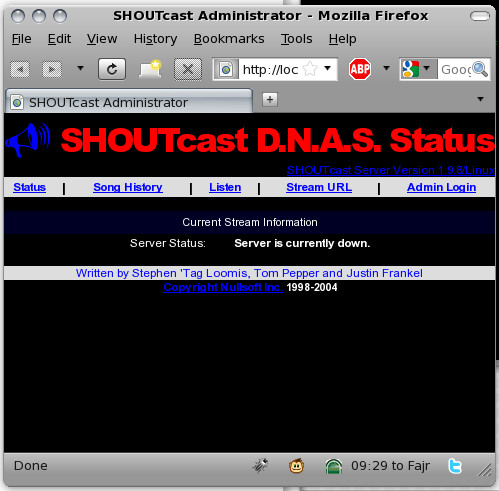
Hmm.. also click on listen to test… but that can wait.. until we feed something to it to stream first.. wait..
Then..time to feed it with some source..
oh.. need to download another client.
if in windows have to download
1. WinAMP .
2. Shoutcast Radio DSP Plugin for WinAMP. (here.)
and for linux like me.
just download this binary .
sc_trans_posic_040.tgz
extract it.
cd /home/user/bin/ wget http://yp.shoutcast.com/downloads/sc_trans_posix_040.tgz tar zxfv sc_trans_posix_040.tgz |
this will extract these files.
/home/user/bin/sc_trans_040/example.lst /home/user/bin/sc_trans_040/sc_trans.conf /home/user/bin/sc_trans_040/sc_trans_freebsd /home/user/bin/sc_trans_040/sc_trans_linux /home/user/bin/sc_trans_040/sc_trans_macosx |
Hmm.. copy out sc_trans_linux
cp /home/user/bin/sc_trans_040/sc_trans_linux /home/user/bin/sc_trans cp /home/user/bin/sc_trans_040/sc_trans.conf /home/user/bin/sc_trans.conf cp /home/user/bin/sc_trans_040/example.lst /home/user/bin/radio.lst |
edit the /home/user/bin/sc_trans.conf to reflect this patch
--- sc_trans.conf.orig 2009-07-02 20:47:06.000000000 +0800 +++ sc_trans.conf 2009-07-02 20:48:18.000000000 +0800 @@ -16,20 +16,20 @@ ; PlaylistFile (required EVEN IF RELAYING) - playlist file (to create, use ; find /path/to/mp3/directory -type f -name "*.mp3" > playlist_filename.lst -PlaylistFile=example.lst +PlaylistFile=radio.lst ; ServerIP/ServerPort are the target server to send to -ServerIP=myserver.com +ServerIP=localhost ServerPort=8000 ; Password is the password on the sc_serv you're sending to. -Password=yourpassword +Password=letmebroadcast ; StreamTitle/URL/Genre define the data that appears on the directory and in the ; stream info. -StreamTitle=My Gay Son -StreamURL=http://mygayson.com -Genre=genres go here +StreamTitle=HawkEYE Radio +StreamURL=http://radio.namran.net/listen.pls +Genre=Indie ; Logfile optionally denotes a text file to log sc_trans to. a kill -HUP ; will force a close and re-open of this file (but will also cease logging to |
Then have to edit radio.lst for the song listing..
it shall have something like this..pointing to wherever you song file is..
# the .conf file! /home/sctrans/content/test_1.mp3 /home/sctrans/content/test_2.mp3 |
Hmm.. then here i would to too shortcut ..
I run a xmms..
click on new playlist..
click on “Add Directory”
browse and point to my song folder.
press Add.
Save the Playlist .. to a “newlist-for-radio.pls”
that’s it..
it will have something like this ..inside it.
[playlist] NumberOfEntries=489 File1=http://192.168.133.254:8000/ File2=/home/namran/my-mp3/album/Best of dance 4-2008/1.Save Me (Album Version).mp3 File3=/home/namran/my-mp3/album/Best of dance 4-2008/10.What´s Love.mp3 File4=/home/namran/my-mp3/album/Best of dance 4-2008/11.Here Comes The Sun (Radio Edit).mp3 |
then.. use the script below to clean it…
#!/bin/sh XMMS_FILE=/home/namran/Desktop/newlist-for-radio.pls RADIO_FILE=/home/namran/Desktop/radio.lst # cleaning the playlist /usr/bin/awk ' /^File[0-9]*=/ { print } ' $XMMS_FILE > $RADIO_FILE # removing front part of the filename /bin/sed -i -e 's/^File[0-9]*=//g' $RADIO_FILE |
so that the output become something like this ..
/home/namran/my-mp3/album/Best of dance 4-2008/1.Save Me (Album Version).mp3 /home/namran/my-mp3/album/Best of dance 4-2008/10.What´s Love.mp3 /home/namran/my-mp3/album/Best of dance 4-2008/11.Here Comes The Sun (Radio Edit).mp3 /home/namran/my-mp3/album/Best of dance 4-2008/12.Hungry Eyes (Original Mix Edit).mp3 /home/namran/my-mp3/album/Best of dance 4-2008/13.Fallen Star (Jean Elan Edit).mp3 /home/namran/my-mp3/album/Best of dance 4-2008/14.What´s Up (Radio Edit).mp3 /home/namran/my-mp3/album/Best of dance 4-2008/15.Get The Party Started (B&J Radio Remix).mp3 /home/namran/my-mp3/album/Best of dance 4-2008/16.La Isla Bonita (Crew 7 Radio Remix).mp3 /home/namran/my-mp3/album/Best of dance 4-2008/17.Brasil (Radio Edit).mp3 /home/namran/my-mp3/album/Best of dance 4-2008/18.Herz An Herz (Manian Remix).mp3 /home/namran/my-mp3/album/Best of dance 4-2008/19.Cuando (Floresca el Chuno) (Sunshine Radio Mix).mp3 /home/namran/my-mp3/album/Best of dance 4-2008/2.Could You, Would You, Should You (Dance Radio Edit).mp3 /home/namran/my-mp3/album/Best of dance 4-2008/20.Memory (Radio Edit).mp3 |
(Hmm… wonder if user searching for above mp3 file will also pick up this page ~ sorry guys ~)
Then.. almost done..
copy that radio.lst into /home/user/bin/
to run the broadcast client source..
cd /home/user/bin/ ./sc_trans |
if succeed will have something like this..
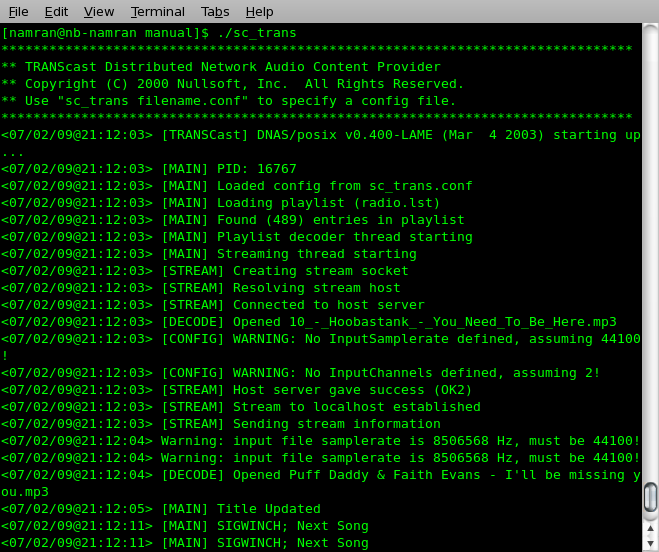
then..the web interface will automatically updated..
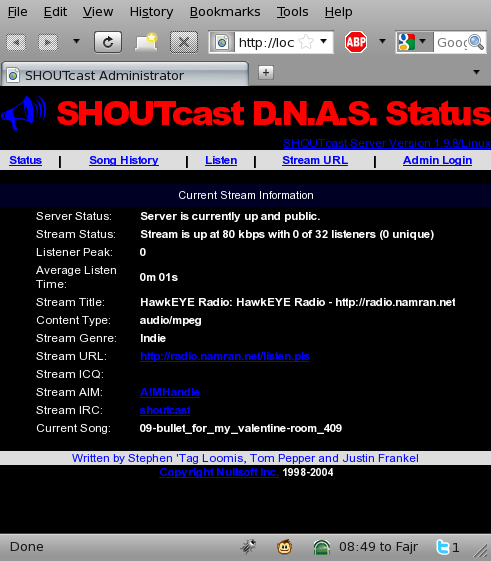
If don’t want to be listed into public radio list somewhere on the net.
change the following line in sc_trans.conf
; Public determines whether or not this station will show up in the directory Public=0 |
to
; Public determines whether or not this station will show up in the directory Public=1 |
Hmm.. there are lot of radio out there.. select whichever that you like.
Welcome to club…~ yeah..~
then can listen to our radio anywhere..
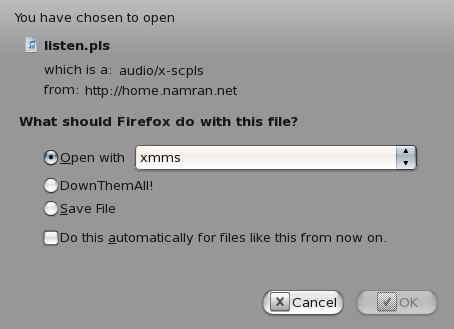
well.. mine is now streaming at http://radio.namran.net
Yay.. finally .. don’t have to bring along my mp3 / ogg file whenever i go ..~
but the music still can be the one that I prefer.. hahaha..
At the moment is still “shuffle”.. as don’t feel like to put in “Song Requester”
Which only available for windows DSP plugin at the moment.. *bump* 😎
also afraid if start going down that road.. will become a DJ again~..hahaha..
Anyway ..whoever want to become a DJ.. with windows WinAMP software..
can request to have access to broadcast via my server also..hahaa.
Send your request / resume to radio [at] namran [dot] net
with the subject “I want to be a DJ at namran.net “
p/s : Music ~ can be a therapy to the busy mind.. and also be a getaway
from the hectic life.. and also can be one sort of self-expression ~ get creative lah… ! ~.
It runs perfect on my Centos 5.3! thank you.
[root@localhost ~]# yum install obexftp gnome-bluetooth
Loaded plugins: fastestmirror
Loading mirror speeds from cached hostfile
* base: http://ftp.cuhk.edu.hk
* updates: http://ftp.cuhk.edu.hk
* addons: http://ftp.cuhk.edu.hk
* extras: http://ftp.cuhk.edu.hk
Setting up Install Process
Parsing package install arguments
No package obexftp available.
Resolving Dependencies
–> Running transaction check
—> Package gnome-bluetooth.i386 0:0.7.0-10.2.el5 set to be updated
–> Processing Dependency: gnome-bluetooth-libs = 0.7.0-10.2.el5 for package: gnome-bluetooth
–> Processing Dependency: libopenobex.so.1 for package: gnome-bluetooth
–> Processing Dependency: libgnomebt.so.0 for package: gnome-bluetooth
–> Processing Dependency: libbtctl.so.2 for package: gnome-bluetooth
–> Running transaction check
—> Package openobex.i386 0:1.3-3.1 set to be updated
—> Package gnome-bluetooth-libs.i386 0:0.7.0-10.2.el5 set to be updated
—> Package libbtctl.i386 0:0.6.0-9.2.el5 set to be updated
–> Finished Dependency Resolution
Dependencies Resolved
================================================================================
Package Arch Version Repository Size
================================================================================
Installing:
gnome-bluetooth i386 0.7.0-10.2.el5 base 235 k
Installing for dependencies:
gnome-bluetooth-libs i386 0.7.0-10.2.el5 base 65 k
libbtctl i386 0.6.0-9.2.el5 base 44 k
openobex i386 1.3-3.1 base 21 k
Transaction Summary
================================================================================
Install 4 Package(s)
Update 0 Package(s)
Remove 0 Package(s)
Total download size: 365 k
Is this ok [y/N]: y
Downloading Packages:
(1/4): openobex-1.3-3.1.i386.rpm | 21 kB 00:00
(2/4): libbtctl-0.6.0-9.2.el5.i386.rpm | 44 kB 00:01
(3/4): gnome-bluetooth-libs-0.7.0-10.2.el5.i386.rpm | 65 kB 00:01
(4/4): gnome-bluetooth-0.7.0-10.2.el5.i386.rpm | 235 kB 00:02
——————————————————————————–
Total 26 kB/s | 365 kB 00:14
Running rpm_check_debug
Running Transaction Test
Finished Transaction Test
Transaction Test Succeeded
Running Transaction
Installing : openobex [1/4]
Installing : libbtctl [2/4]
Installing : gnome-bluetooth-libs [3/4]
Installing : gnome-bluetooth [4/4]
Installed: gnome-bluetooth.i386 0:0.7.0-10.2.el5
Dependency Installed: gnome-bluetooth-libs.i386 0:0.7.0-10.2.el5 libbtctl.i386 0:0.6.0-9.2.el5 openobex.i386 0:1.3-3.1
Complete!
[root@localhost ~]# sdptool browse
Inquiring …
Browsing 00:1E:37:69:33:A7 …
Browsing 00:24:7E:21:FF:BB …
Browsing 00:1E:37:6E:BE:F3 …
Service Name: Bluetooth Serial Port
Service RecHandle: 0x10000
Service Class ID List:
“Serial Port” (0x1101)
Protocol Descriptor List:
“L2CAP” (0x0100)
“RFCOMM” (0x0003)
Channel: 1
Language Base Attr List:
code_ISO639: 0x656e
encoding: 0x6a
base_offset: 0x100
Profile Descriptor List:
“Serial Port” (0x1101)
Version: 0x0100
Service Name: Network Access
Service RecHandle: 0x10001
Service Class ID List:
“PAN Group Network” (0x1117)
Protocol Descriptor List:
“L2CAP” (0x0100)
PSM: 15
“BNEP” (0x000f)
Version: 0x0100
SEQ8: 0 6 dd
Language Base Attr List:
code_ISO639: 0x656e
encoding: 0x6a
base_offset: 0x100
Profile Descriptor List:
“PAN Group Network” (0x1117)
Version: 0x0100
Service Name: Network Access
Service RecHandle: 0x10002
Service Class ID List:
“PAN User” (0x1115)
Protocol Descriptor List:
“L2CAP” (0x0100)
PSM: 15
“BNEP” (0x000f)
Version: 0x0100
SEQ8: 0 6 dd
Language Base Attr List:
code_ISO639: 0x656e
encoding: 0x6a
base_offset: 0x100
Profile Descriptor List:
“PAN User” (0x1115)
Version: 0x0100
Service Name: Dial-up Networking
Service RecHandle: 0x10003
Service Class ID List:
“Dialup Networking” (0x1103)
Protocol Descriptor List:
“L2CAP” (0x0100)
“RFCOMM” (0x0003)
Channel: 2
Language Base Attr List:
code_ISO639: 0x656e
encoding: 0x6a
base_offset: 0x100
Profile Descriptor List:
“Dialup Networking” (0x1103)
Version: 0x0100
Service Name: PIM Item Transfer
Service RecHandle: 0x10004
Service Class ID List:
“OBEX Object Push” (0x1105)
Protocol Descriptor List:
“L2CAP” (0x0100)
“RFCOMM” (0x0003)
Channel: 3
“OBEX” (0x0008)
Language Base Attr List:
code_ISO639: 0x656e
encoding: 0x6a
base_offset: 0x100
Profile Descriptor List:
“OBEX Object Push” (0x1105)
Version: 0x0100
Service Name: File Transfer
Service RecHandle: 0x10005
Service Class ID List:
“OBEX File Transfer” (0x1106)
Protocol Descriptor List:
“L2CAP” (0x0100)
“RFCOMM” (0x0003)
Channel: 4
“OBEX” (0x0008)
Language Base Attr List:
code_ISO639: 0x656e
encoding: 0x6a
base_offset: 0x100
Profile Descriptor List:
“OBEX File Transfer” (0x1106)
Version: 0x0100
Service Name: Fax
Service RecHandle: 0x10006
Service Class ID List:
“Fax” (0x1111)
Protocol Descriptor List:
“L2CAP” (0x0100)
“RFCOMM” (0x0003)
Channel: 5
Language Base Attr List:
code_ISO639: 0x656e
encoding: 0x6a
base_offset: 0x100
Profile Descriptor List:
“Fax” (0x1111)
Version: 0x0100
Service Name: PIM Synchronization
Service RecHandle: 0x10007
Service Class ID List:
“IrMC Sync” (0x1104)
Protocol Descriptor List:
“L2CAP” (0x0100)
“RFCOMM” (0x0003)
Channel: 6
“OBEX” (0x0008)
Language Base Attr List:
code_ISO639: 0x656e
encoding: 0x6a
base_offset: 0x100
Profile Descriptor List:
“IrMC Sync” (0x1104)
Version: 0x0100
Service Name: Sync Command Service
Service RecHandle: 0x10008
Service Class ID List:
“IrMC Sync Command” (0x1107)
Protocol Descriptor List:
“L2CAP” (0x0100)
“RFCOMM” (0x0003)
Channel: 6
“OBEX” (0x0008)
Language Base Attr List:
code_ISO639: 0x656e
encoding: 0x6a
base_offset: 0x100
Profile Descriptor List:
“IrMC Sync” (0x1104)
Version: 0x0100
Service Name: Headset
Service RecHandle: 0x10009
Service Class ID List:
“Headset” (0x1108)
“Generic Audio” (0x1203)
Protocol Descriptor List:
“L2CAP” (0x0100)
“RFCOMM” (0x0003)
Channel: 7
Language Base Attr List:
code_ISO639: 0x656e
encoding: 0x6a
base_offset: 0x100
Profile Descriptor List:
“Headset” (0x1108)
Version: 0x0100
Service Name: Stereo Audio
Service RecHandle: 0x1000a
Service Class ID List:
“Audio Sink” (0x110b)
Protocol Descriptor List:
“L2CAP” (0x0100)
PSM: 25
“AVDTP” (0x0019)
uint16: 0x100
Language Base Attr List:
code_ISO639: 0x656e
encoding: 0x6a
base_offset: 0x100
Profile Descriptor List:
“Advanced Audio” (0x110d)
Version: 0x0100
Service RecHandle: 0x1000b
Service Class ID List:
“AV Remote Target” (0x110c)
Protocol Descriptor List:
“L2CAP” (0x0100)
PSM: 23
“AVCTP” (0x0017)
uint16: 0x100
Profile Descriptor List:
“AV Remote” (0x110e)
Version: 0x0100
Service Name: Audio Source
Service RecHandle: 0x1000c
Service Class ID List:
“Audio Source” (0x110a)
Protocol Descriptor List:
“L2CAP” (0x0100)
PSM: 25
“AVDTP” (0x0019)
uint16: 0x100
Profile Descriptor List:
“Advanced Audio” (0x110d)
Version: 0x0100
Service Name: Bluetooth Imaging
Service RecHandle: 0x1000d
Service Class ID List:
“Imaging Responder” (0x111b)
Protocol Descriptor List:
“L2CAP” (0x0100)
“RFCOMM” (0x0003)
Channel: 8
“OBEX” (0x0008)
Language Base Attr List:
code_ISO639: 0x656e
encoding: 0x6a
base_offset: 0x100
Profile Descriptor List:
“Imaging” (0x111a)
Version: 0x0100
Service Name: Audio Gateway
Service RecHandle: 0x1000e
Service Class ID List:
“Headset Audio Gateway” (0x1112)
“Generic Audio” (0x1203)
Protocol Descriptor List:
“L2CAP” (0x0100)
“RFCOMM” (0x0003)
Channel: 9
Profile Descriptor List:
“Headset” (0x1108)
Version: 0x0100
Service Name: Audio Gateway
Service RecHandle: 0x1000f
Service Class ID List:
“Handfree Audio Gateway” (0x111f)
“Generic Audio” (0x1203)
Protocol Descriptor List:
“L2CAP” (0x0100)
“RFCOMM” (0x0003)
Channel: 10
Profile Descriptor List:
“Handsfree” (0x111e)
Version: 0x0101
Browsing 00:21:86:C2:4B:5A …
Failed to connect to SDP server on 00:1E:37:69:1F:51: Host is down
Browsing 00:24:7E:98:97:23 …
********************QUESTION*********************
why it shows that no package obexftp available
and after that what is that hanphone…????
can u post it with few more screenshot of commands also…so that its get easyyyyyyyy
waitingggggggggggggggggg….
thanxxxxxxxxxxxxxxxxxxxxxxxxxxxxxxx
You might need to add rpmforge repo as per this link..
http://dag.wieers.com/rpm/FAQ.php#B2
obexfs command not found…
how to resolve???
yum installation not workingggggggg
what to doooooooo???
Well.
I install with succes all in centos 5.4 the latest version with latest update and when i type obex:// in my computer address :
Nautilus cannot disply “obex:///”
Please select another viewer and try again.
???