How to connect GPRS via Bluetooth on k530i in CentOS

First have to make sure your bluetooth card on pc/laptop is properly installed and detected by kernel.

On Dell 630 , stock on-board Bluetooth card just working out-of-the-box without any additional setting..

Requirement :

1. Dell 630 . with CentOS 5.2

2. Sony Ericsson k530i

3. Maxis 3G SIM card. (3G enabled)

Just to check.

[root@nb-namran bin]# rpm -qa | grep bluetooth
gnome-bluetooth-0.7.0-10.2.el5
gnome-bluetooth-libs-0.7.0-10.2.el5

set the /etc/bluetooth/hcid.conf something alike the one below..

[root@nb-namran bin]# cat /etc/bluetooth/hcid.conf
#
# HCI daemon configuration file.
#
# HCId options
options {
# Automatically initialize new devices
autoinit yes;
# Security Manager mode
# none - Security manager disabled
# auto - Use local PIN for incoming connections
# user - Always ask user for a PIN
#
#security none;
security user;
# Pairing mode
# none - Pairing disabled
# multi - Allow pairing with already paired devices
# once - Pair once and deny successive attempts
pairing multi;
# Default PIN code for incoming connections
passkey "0";
}
# Default settings for HCI devices
device {
# Local device name
# %d - device id
# %h - host name
#name "%h-%d";
#name "%h-%d";
name "prelude";
# Local device class
class 0x120104;
# Default packet type
#pkt_type DH1,DM1,HV1;
# Inquiry and Page scan
iscan enable; pscan enable;
# Default link mode
# none - no specific policy
# accept - always accept incoming connections
# master - become master on incoming connections,
# deny role switch on outgoing connections
lm accept;
# Default link policy
# none - no specific policy
# rswitch - allow role switch
# hold - allow hold mode
# sniff - allow sniff mode
# park - allow park mode
lp rswitch,hold,sniff,park;
}

then run

/etc/init.d/bluetooth start

enable the bluetooth on the phone .. (remove previous detected/connected Bluetooth devices that related to this laptop/pc)

then .. run

hciconfig

shall see somtething like this..

[root@nb-namran bin]# hciconfig
hci0: Type: USB
BD Address: 00:1E:37:80:BA:46 ACL MTU: 310:10 SCO MTU: 64:8
UP RUNNING PSCAN
RX bytes:24032 acl:597 sco:0 events:969 errors:0
TX bytes:13639 acl:593 sco:0 commands:186 errors:0

then scan for your handphone..

hcitool scan

will have something like this..
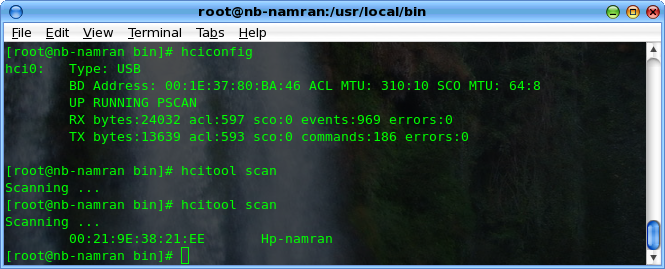
hcitool-scan.png

then..

run

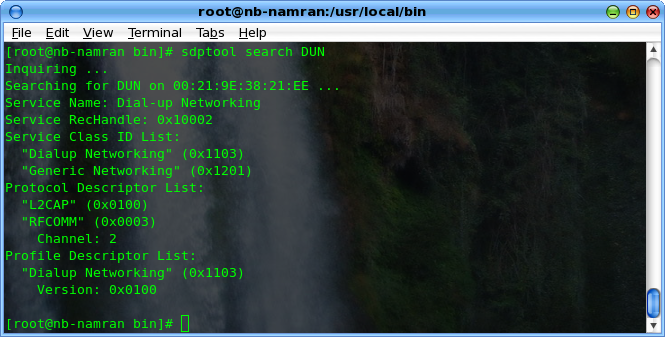
sdptool search DUN

sdptool-search-dun.png

mind the channel number and the id.. as is example is Channel 2

then run

l2ping 00:21:9E:38:21:EE
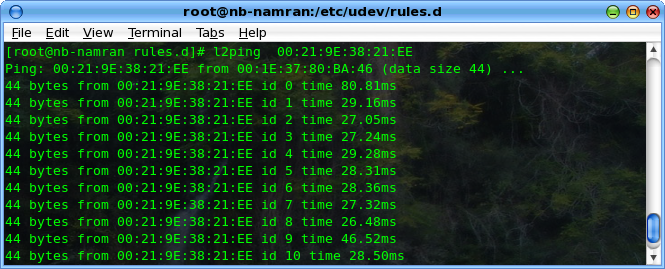
l2ping.png

then..

[root@nb-namran]# rfcomm bind 2 00:21:9E:38:21:EE 2

this will bind the bluetooth DUN to /dev/rfcomm2

check..

[root@nb-namran ]# rfcomm
rfcomm2: 00:21:9E:38:21:EE channel 2 clean
make sure the device is created in /dev/rfcomm2

[root@nb-namran rules.d]# ll /dev/rfcomm2
crw------- 1 namran root 216, 2 Dec 18 01:13 /dev/rfcomm2

then.. test it with

minicom -s rfcomm2

set the serial port to /dev/rfcomm2

and speed as 57600 8-N-1

the rest disable. save .. restart minicom with

minicom rfcomm2

on the first time ..it will Initialize the modem

and the phone will prompt to allow pc/laptop to connect to it as modem..

press always allow / always ask .. (either will work)

then it will ask you to specify the pass phrase key.. put anykey..

and on linux machine also will popup to enter pass phrase key..

enter the same pass key..

if succesfully connected minicom to serial and enter ATI .. shall return phone model. as below.
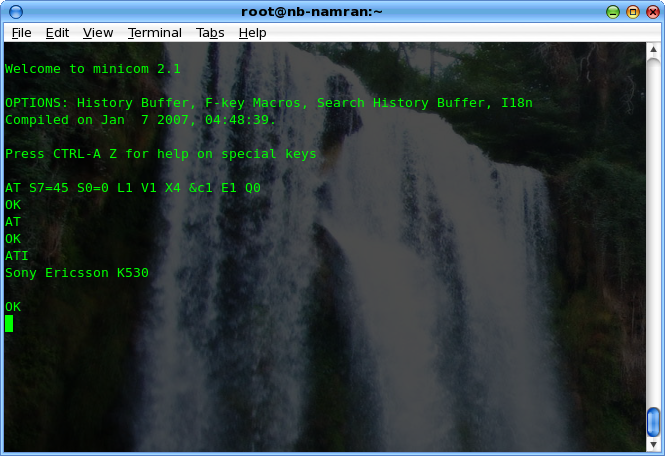
at-sony.png

..

now to get hook to GPRS/ 3G / EDGE..

create a file in /usr/local/bin/go_gprs.sh

with these content..

#! /bin/sh
if [ $# -lt 5 ] ; then
echo "go_gprs.sh <tty??> <speed> <APN> <user> <pass> <parms>"
exit
fi
echo port $1
echo speed $2
echo apn $3
echo user $4
echo pass $5
echo parms $6
/usr/sbin/pppd /dev/$1 $2 nodetach debug crtscts linkname "$1.link" connect "chat -v ECHO OFF TIMEOUT 15 '' AT OK 'AT+CGDCONT=1,\"IP\",\"$3\"' OK ATE0V1 OK ATDT*99# CONNECT" lcp-echo-interval 20 lcp-echo-failure 3 usepeerdns user "$4" password "$5" defaultroute

.. and another one.. depend on your ISP..

/usr/local/bin/go_k530i_maxis

with these..

#!/bin/sh
/usr/local/bin/go_gprs.sh rfcomm2 115200 unet maxis wap

make those as executable..

chmod a+x /usr/local/go_*

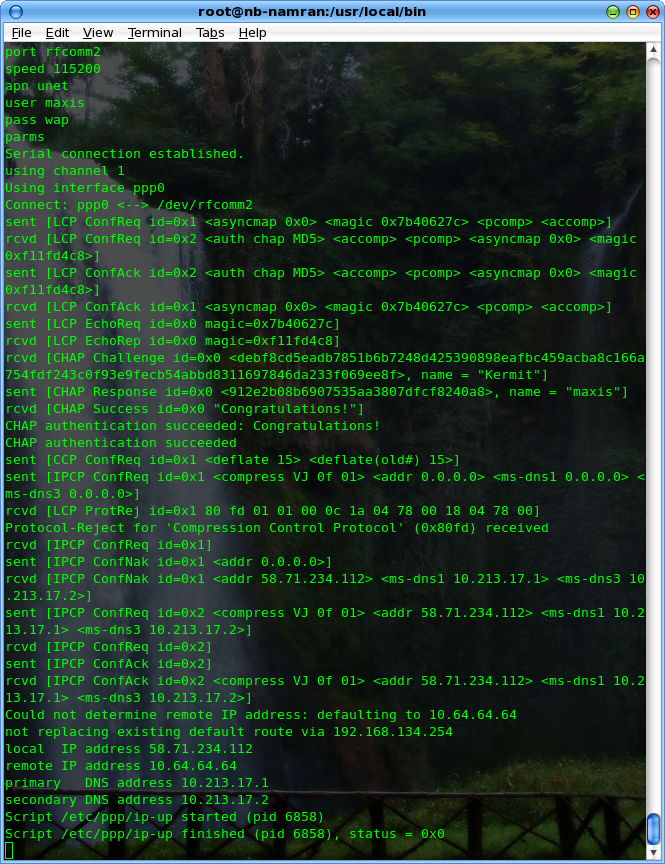
then.. to connect to maxis 3G..

just type..

go_k530i_maxis

to disconnect.. CTRL+C

it will have something like this..
rfcomm2.png

Reference : http://www.niemueller.de/wiki/?GPRSviaBluetooth

Source : go_gprs.sh is taken from .sha

Related Post

5 Responses

  1. ffrancesco says:

    It runs perfect on my Centos 5.3! thank you.

    Reply
  2. jd says:

    [root@localhost ~]# yum install obexftp gnome-bluetooth
    Loaded plugins: fastestmirror
    Loading mirror speeds from cached hostfile
    * base: http://ftp.cuhk.edu.hk
    * updates: http://ftp.cuhk.edu.hk
    * addons: http://ftp.cuhk.edu.hk
    * extras: http://ftp.cuhk.edu.hk
    Setting up Install Process
    Parsing package install arguments
    No package obexftp available.
    Resolving Dependencies
    –> Running transaction check
    —> Package gnome-bluetooth.i386 0:0.7.0-10.2.el5 set to be updated
    –> Processing Dependency: gnome-bluetooth-libs = 0.7.0-10.2.el5 for package: gnome-bluetooth
    –> Processing Dependency: libopenobex.so.1 for package: gnome-bluetooth
    –> Processing Dependency: libgnomebt.so.0 for package: gnome-bluetooth
    –> Processing Dependency: libbtctl.so.2 for package: gnome-bluetooth
    –> Running transaction check
    —> Package openobex.i386 0:1.3-3.1 set to be updated
    —> Package gnome-bluetooth-libs.i386 0:0.7.0-10.2.el5 set to be updated
    —> Package libbtctl.i386 0:0.6.0-9.2.el5 set to be updated
    –> Finished Dependency Resolution

    Dependencies Resolved

    ================================================================================
    Package Arch Version Repository Size
    ================================================================================
    Installing:
    gnome-bluetooth i386 0.7.0-10.2.el5 base 235 k
    Installing for dependencies:
    gnome-bluetooth-libs i386 0.7.0-10.2.el5 base 65 k
    libbtctl i386 0.6.0-9.2.el5 base 44 k
    openobex i386 1.3-3.1 base 21 k

    Transaction Summary
    ================================================================================
    Install 4 Package(s)
    Update 0 Package(s)
    Remove 0 Package(s)

    Total download size: 365 k
    Is this ok [y/N]: y
    Downloading Packages:
    (1/4): openobex-1.3-3.1.i386.rpm | 21 kB 00:00
    (2/4): libbtctl-0.6.0-9.2.el5.i386.rpm | 44 kB 00:01
    (3/4): gnome-bluetooth-libs-0.7.0-10.2.el5.i386.rpm | 65 kB 00:01
    (4/4): gnome-bluetooth-0.7.0-10.2.el5.i386.rpm | 235 kB 00:02
    ——————————————————————————–
    Total 26 kB/s | 365 kB 00:14
    Running rpm_check_debug
    Running Transaction Test
    Finished Transaction Test
    Transaction Test Succeeded
    Running Transaction
    Installing : openobex [1/4]
    Installing : libbtctl [2/4]
    Installing : gnome-bluetooth-libs [3/4]
    Installing : gnome-bluetooth [4/4]

    Installed: gnome-bluetooth.i386 0:0.7.0-10.2.el5
    Dependency Installed: gnome-bluetooth-libs.i386 0:0.7.0-10.2.el5 libbtctl.i386 0:0.6.0-9.2.el5 openobex.i386 0:1.3-3.1
    Complete!
    [root@localhost ~]# sdptool browse
    Inquiring …
    Browsing 00:1E:37:69:33:A7 …
    Browsing 00:24:7E:21:FF:BB …
    Browsing 00:1E:37:6E:BE:F3 …
    Service Name: Bluetooth Serial Port
    Service RecHandle: 0x10000
    Service Class ID List:
    “Serial Port” (0x1101)
    Protocol Descriptor List:
    “L2CAP” (0x0100)
    “RFCOMM” (0x0003)
    Channel: 1
    Language Base Attr List:
    code_ISO639: 0x656e
    encoding: 0x6a
    base_offset: 0x100
    Profile Descriptor List:
    “Serial Port” (0x1101)
    Version: 0x0100

    Service Name: Network Access
    Service RecHandle: 0x10001
    Service Class ID List:
    “PAN Group Network” (0x1117)
    Protocol Descriptor List:
    “L2CAP” (0x0100)
    PSM: 15
    “BNEP” (0x000f)
    Version: 0x0100
    SEQ8: 0 6 dd
    Language Base Attr List:
    code_ISO639: 0x656e
    encoding: 0x6a
    base_offset: 0x100
    Profile Descriptor List:
    “PAN Group Network” (0x1117)
    Version: 0x0100

    Service Name: Network Access
    Service RecHandle: 0x10002
    Service Class ID List:
    “PAN User” (0x1115)
    Protocol Descriptor List:
    “L2CAP” (0x0100)
    PSM: 15
    “BNEP” (0x000f)
    Version: 0x0100
    SEQ8: 0 6 dd
    Language Base Attr List:
    code_ISO639: 0x656e
    encoding: 0x6a
    base_offset: 0x100
    Profile Descriptor List:
    “PAN User” (0x1115)
    Version: 0x0100

    Service Name: Dial-up Networking
    Service RecHandle: 0x10003
    Service Class ID List:
    “Dialup Networking” (0x1103)
    Protocol Descriptor List:
    “L2CAP” (0x0100)
    “RFCOMM” (0x0003)
    Channel: 2
    Language Base Attr List:
    code_ISO639: 0x656e
    encoding: 0x6a
    base_offset: 0x100
    Profile Descriptor List:
    “Dialup Networking” (0x1103)
    Version: 0x0100

    Service Name: PIM Item Transfer
    Service RecHandle: 0x10004
    Service Class ID List:
    “OBEX Object Push” (0x1105)
    Protocol Descriptor List:
    “L2CAP” (0x0100)
    “RFCOMM” (0x0003)
    Channel: 3
    “OBEX” (0x0008)
    Language Base Attr List:
    code_ISO639: 0x656e
    encoding: 0x6a
    base_offset: 0x100
    Profile Descriptor List:
    “OBEX Object Push” (0x1105)
    Version: 0x0100

    Service Name: File Transfer
    Service RecHandle: 0x10005
    Service Class ID List:
    “OBEX File Transfer” (0x1106)
    Protocol Descriptor List:
    “L2CAP” (0x0100)
    “RFCOMM” (0x0003)
    Channel: 4
    “OBEX” (0x0008)
    Language Base Attr List:
    code_ISO639: 0x656e
    encoding: 0x6a
    base_offset: 0x100
    Profile Descriptor List:
    “OBEX File Transfer” (0x1106)
    Version: 0x0100

    Service Name: Fax
    Service RecHandle: 0x10006
    Service Class ID List:
    “Fax” (0x1111)
    Protocol Descriptor List:
    “L2CAP” (0x0100)
    “RFCOMM” (0x0003)
    Channel: 5
    Language Base Attr List:
    code_ISO639: 0x656e
    encoding: 0x6a
    base_offset: 0x100
    Profile Descriptor List:
    “Fax” (0x1111)
    Version: 0x0100

    Service Name: PIM Synchronization
    Service RecHandle: 0x10007
    Service Class ID List:
    “IrMC Sync” (0x1104)
    Protocol Descriptor List:
    “L2CAP” (0x0100)
    “RFCOMM” (0x0003)
    Channel: 6
    “OBEX” (0x0008)
    Language Base Attr List:
    code_ISO639: 0x656e
    encoding: 0x6a
    base_offset: 0x100
    Profile Descriptor List:
    “IrMC Sync” (0x1104)
    Version: 0x0100

    Service Name: Sync Command Service
    Service RecHandle: 0x10008
    Service Class ID List:
    “IrMC Sync Command” (0x1107)
    Protocol Descriptor List:
    “L2CAP” (0x0100)
    “RFCOMM” (0x0003)
    Channel: 6
    “OBEX” (0x0008)
    Language Base Attr List:
    code_ISO639: 0x656e
    encoding: 0x6a
    base_offset: 0x100
    Profile Descriptor List:
    “IrMC Sync” (0x1104)
    Version: 0x0100

    Service Name: Headset
    Service RecHandle: 0x10009
    Service Class ID List:
    “Headset” (0x1108)
    “Generic Audio” (0x1203)
    Protocol Descriptor List:
    “L2CAP” (0x0100)
    “RFCOMM” (0x0003)
    Channel: 7
    Language Base Attr List:
    code_ISO639: 0x656e
    encoding: 0x6a
    base_offset: 0x100
    Profile Descriptor List:
    “Headset” (0x1108)
    Version: 0x0100

    Service Name: Stereo Audio
    Service RecHandle: 0x1000a
    Service Class ID List:
    “Audio Sink” (0x110b)
    Protocol Descriptor List:
    “L2CAP” (0x0100)
    PSM: 25
    “AVDTP” (0x0019)
    uint16: 0x100
    Language Base Attr List:
    code_ISO639: 0x656e
    encoding: 0x6a
    base_offset: 0x100
    Profile Descriptor List:
    “Advanced Audio” (0x110d)
    Version: 0x0100

    Service RecHandle: 0x1000b
    Service Class ID List:
    “AV Remote Target” (0x110c)
    Protocol Descriptor List:
    “L2CAP” (0x0100)
    PSM: 23
    “AVCTP” (0x0017)
    uint16: 0x100
    Profile Descriptor List:
    “AV Remote” (0x110e)
    Version: 0x0100

    Service Name: Audio Source
    Service RecHandle: 0x1000c
    Service Class ID List:
    “Audio Source” (0x110a)
    Protocol Descriptor List:
    “L2CAP” (0x0100)
    PSM: 25
    “AVDTP” (0x0019)
    uint16: 0x100
    Profile Descriptor List:
    “Advanced Audio” (0x110d)
    Version: 0x0100

    Service Name: Bluetooth Imaging
    Service RecHandle: 0x1000d
    Service Class ID List:
    “Imaging Responder” (0x111b)
    Protocol Descriptor List:
    “L2CAP” (0x0100)
    “RFCOMM” (0x0003)
    Channel: 8
    “OBEX” (0x0008)
    Language Base Attr List:
    code_ISO639: 0x656e
    encoding: 0x6a
    base_offset: 0x100
    Profile Descriptor List:
    “Imaging” (0x111a)
    Version: 0x0100

    Service Name: Audio Gateway
    Service RecHandle: 0x1000e
    Service Class ID List:
    “Headset Audio Gateway” (0x1112)
    “Generic Audio” (0x1203)
    Protocol Descriptor List:
    “L2CAP” (0x0100)
    “RFCOMM” (0x0003)
    Channel: 9
    Profile Descriptor List:
    “Headset” (0x1108)
    Version: 0x0100

    Service Name: Audio Gateway
    Service RecHandle: 0x1000f
    Service Class ID List:
    “Handfree Audio Gateway” (0x111f)
    “Generic Audio” (0x1203)
    Protocol Descriptor List:
    “L2CAP” (0x0100)
    “RFCOMM” (0x0003)
    Channel: 10
    Profile Descriptor List:
    “Handsfree” (0x111e)
    Version: 0x0101

    Browsing 00:21:86:C2:4B:5A …
    Failed to connect to SDP server on 00:1E:37:69:1F:51: Host is down
    Browsing 00:24:7E:98:97:23 …

    ********************QUESTION*********************
    why it shows that no package obexftp available

    and after that what is that hanphone…????

    can u post it with few more screenshot of commands also…so that its get easyyyyyyyy
    waitingggggggggggggggggg….
    thanxxxxxxxxxxxxxxxxxxxxxxxxxxxxxxx

    Reply
  3. jd says:

    obexfs command not found…
    how to resolve???
    yum installation not workingggggggg
    what to doooooooo???

    Reply
  4. crisstm says:

    Well.
    I install with succes all in centos 5.4 the latest version with latest update and when i type obex:// in my computer address :
    Nautilus cannot disply “obex:///”
    Please select another viewer and try again.
    ???

    Reply

Leave a Reply

Your email address will not be published. Required fields are marked *