
In case you happened to block certain site from being access from you pc/notebook/server or whatever..
let’s say.. it is a “site.com”
let check the ip address of the site..
[root@nb-namran ~]# nslookup site.com

Server:         208.67.222.220

Address:        208.67.222.220#53

Non-authoritative answer:

Name:   site.com

Address: 66.113.131.78
then to block it run
route add -host 66.113.131.78 gw 127.0.0.1
will be routed to localhost (lo) interface instead
in windows would be
route add 66.113.131.78 MASK 255.255.255.255 192.168.1.222
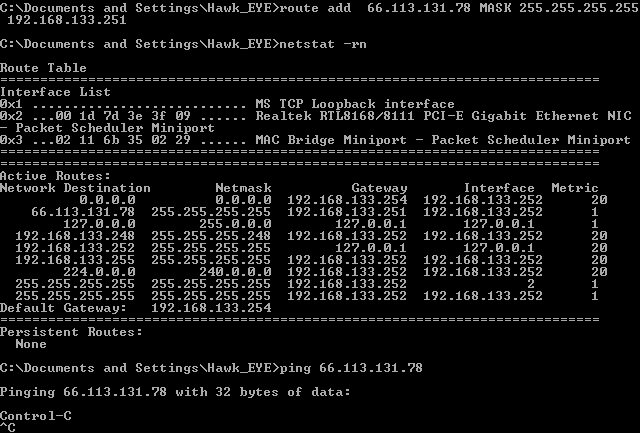
assumed 192.168.1.222 is some ip in your network that not been used.
.. it will be gone after reboot,
but if want it to be permanently would be something like
route -p add 66.113.131.78 MASK 255.255.255.255 192.168.1.222
in linux ..
you could either create a route file for each interface, e.g.,
/etc/sysconfig/network-scripts/route-lo
and put entries in it like this in the file:
66.113.131.78/32 via 127.0.0.1
or you can add route add commands to /etc/rc.local.
yum install -y mythtv-suites –enablerepo atrpms –enablerepo atrpms-testing
should be
yum install -y mythtv-suite –enablerepo atrpms –enablerepo atrpms-testing
also after yum installing all the mythtv packages:
yum install perl-DBD-MySQL php-mysql mysql mysql-server
chkconfig mysqld on
service mysqld start
mysql -u root mysql
mysql> UPDATE user SET Password=PASSWORD(‘mythtv’) WHERE user=’root’;
mysql> FLUSH PRIVILEGES;
mysql> quit
mysql -u root mysql -p < /usr/share/doc/mythtv-docs-0.21/database/mc.sql
if happened to messed with the frontend..
despite the update..
can just..
“yum install -y mythtv-frontend-0.21-213.el5 –enablerepo atrpms ”
woohoo..
mythTV is back..!
Hey There. I found your blog using msn. This is a really well written article.
I will be sure to bookmark it and return to read more of your
useful info. Thanks for the post. I’ll definitely return.
Victorious one CSN Coyotes basketball group.. alot more energy.